

From Grossing to Reporting: Where Does Specimen Identification Matter in the Pathology Workflow
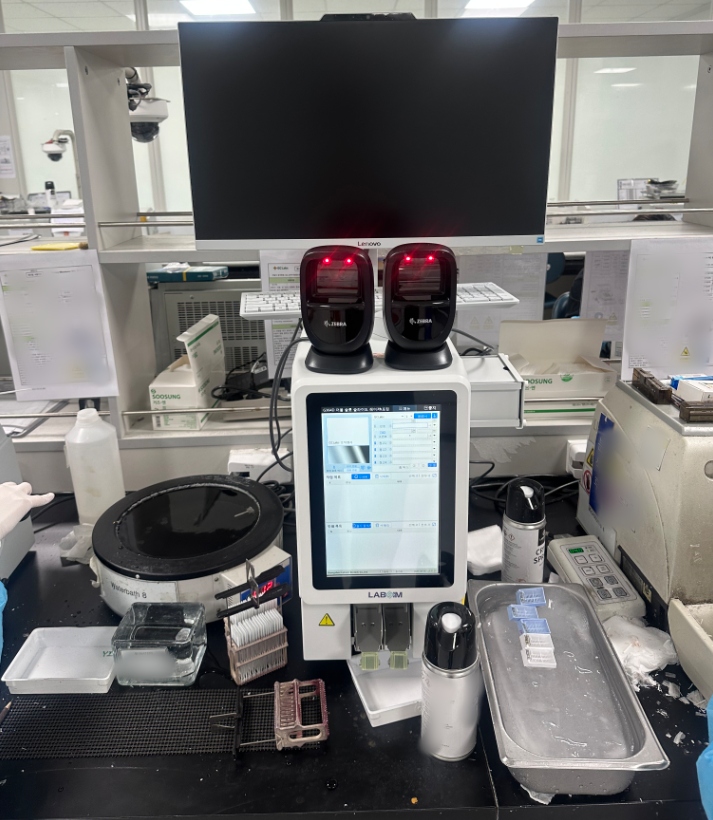
Specimen identification runs through the entire pathology workflow. Its core purpose is to prevent specimen mix-ups and ensure diagnostic reports are assigned to the correct patient. From grossing to report sign-off, every handover and diagnostic step relies on identifiers to secure specimen identity.
1. Specimen Receipt and Registration
This is the specimen "registration" stage. Pathology staff verify the name, medical record number, specimen site and quantity stated on the requisition form and specimen bag. Once verified, a unique pathology number is assigned to each specimen and entered into the system. The identifier is created at this stage to enable full-process traceability.
2. Specimen Grossing
This is the most critical stage. While performing grossing, pathologists must ensure the number on each tissue cassette fully matches the requisition form to rigorously prevent cross-cassette mix-up of tissues from different patients and avoid errors. Detailed records of sampling site, quantity and dimensions are documented during grossing as reference notes for subsequent diagnosis.
3. Dehydration, Embedding and Sectioning
During slide preparation, staff verify ID numbers, specimen type, section count and quality. Paraffin blocks and glass slides are linked to the corresponding tissue block via identifiers to guarantee sections originate from the correct specimen. At the sectioning stage, intelligent pathology slide printers print specimen IDs directly onto microscope slides, ensuring every section can be traced back to the right patient and specimen and eliminating mix-up risks.
Histology printers are typically placed beside microtomes. After technicians cut paraffin ribbons and mount tissue sections onto glass slides, the printer marks IDs, QR codes or barcodes on the writing surface of slides. Labsim thermal printers and UV laser printers support integration with hospital LIS/HIS systems to automatically retrieve patient data. Manual handwriting is eliminated, lowering the risk of human error.
4. Staining and Microscopic Diagnosis
For diagnosis, the ID number, specimen type, clinical diagnosis and pathological diagnosis are checked. When reviewing slides under a microscope, pathologists must confirm that the slide ID matches information on the requisition form, so microscopic findings can be accurately associated with the patient.
5. Report Review and Sign-off
Before report release, reviewers double-check test items, results, patient name, gender, age, inpatient ID, department and other details. This serves as the final checkpoint to avoid errors. Reports can only be signed off once the review is completed.
The Labsim G306 Slide Thermal Printer adopts cartridge-based thermal printing technology. It can print standard characters, logos and barcodes. Featuring a compact footprint and eco-friendly, pollution-free printing, the unit can be installed beside grossing stations or microtomes, enabling laboratories to implement full-process traceability and quality control management for pathological specimens.
How Do Pathology Laboratories Select Suitable Slide Printers and Tissue Cassette Printers?
When selecting pathology marking printers, laboratories need to first evaluate printing technology, slide/tissue cassette compatibility, printing speed and throughput, system integration, consumables and after-sales support. The final selection should be determined based on the laboratory’s daily specimen volume. Higher price does not always mean better performance, and low price does not equal a suitable solution.
Printing Technologies for Pathology Marking Printers
1. Laser Printing Technology: The printed text is scratch-resistant and permanent. No ink cartridges or ribbons are required. It meets requirements for long-term archiving and maintains clear marks after staining.
2. Thermal Transfer Printing Technology: Delivers sharp print with high contrast. It performs exceptionally well on coloured painted slide surfaces. The printing process is eco-friendly with no waste pollution. The printed marks are corrosion-resistant and long-lasting for specimen preservation.
Key Considerations for Tissue Cassette Printers
1. Tissue Cassette Compatibility: Must support multiple brands of cassettes, including lidded and lidless types with 35° or 45° inclined surfaces.
2. Automatic Sorting and Collection: Whether the printer can automatically arrange and collect cassettes in numerical order after printing to prevent misordering during manual sorting, which directly affects specimen safety.
3. Cassette Loading Capacity: Usually designed with 6 loading slots, holding up to 100 cassettes per slot, catering to high-volume pathology laboratories.
Key Considerations for Slide Printers
1. Loading and Collection Capacity: Commercial slide printers generally hold 100–200 slides for loading; the collection capacity ranges from 100 to 150 slides.
2. Printing Speed: The common requirement is around 2.5–4 seconds per slide.
3. Print Resolution: Thermal transfer slide printers offer ≥600 dpi, while laser slide printers reach 2500 dpi. Both support QR code scanning and recognition.
4. Slide Compatibility: Capable of printing on standard glass slides and IHC slides.
5. Print Orientation: Supports adjustable printing directions at 0° / 90° / 180° / 270°, accommodating various label layout requirements.
The Labsim Pathology Printer is a professional identification printing device specially designed for pathology departments. It consists of two core series: Slide Printer and Tissue Cassette Printer. It supports automated numbering and full-process traceability for specimens in anatomical pathology and cytopathology scenarios.