

What Should Pathology Labs Consider When Choosing a Cassette Printer?
Selecting a cassette printer is an important decision for pathology laboratories seeking reliable specimen identification and efficient daily operations. The right equipment should support the laboratory's processing volume, produce readable identifiers, integrate with existing information systems, and remain practical to operate over its service life. This practical guide helps you identify a suitable cassette printer solutions that support current workflow and future growth.
Define Your Lab's Cassette Printing Requirements
The selection process begins with a clear understanding of how the laboratory handles tissue specimens.
Daily Volume and Peak Workload
Before choosing a cassette printer, you can review how many cassettes your lab print during a typical day and during the busiest processing periods. A lab printing 300 cassettes daily may have different capacity requirements from one that handles 1,000 or more, particularly when many specimens arrive within a short time. It is also worth checking how many cassettes the printer can hold at once, how frequently operators need to reload them, and how long a typical print batch takes. These details help determine whether a printer can keep pace with specimen preparation without creating a backlog at the grossing station.
On-Demand vs. Batch Printing
On-demand printing is suitable for laboratories that print a cassette as each specimen is received or registered, allowing staff to prepare labels according to the immediate workload. Batch printing is more practical when multiple specimens are registered together and their cassettes can be printed in a single run. When evaluating a tissue cassette printer, laboratories should check how easily it handles individual print requests and larger print jobs, whether operators can retrieve the correct cassette for each specimen, and how the system manages interrupted or repeated jobs. The preferred setup depends on whether cassette preparation follows a continuous, specimen-by-specimen process or a scheduled batch workflow.
Cassette Types, Colors, and Identification Needs
Laboratories should confirm that the printer supports the cassette dimensions, material, and design used in their routine workflows. Different cassette models may vary in surface texture, lid structure, and printable area, which can affect print placement and legibility. Color requirements also need consideration, particularly when laboratories use different cassette colors to distinguish specimen types or processing protocols. The printer should reproduce patient or specimen identifiers, accession numbers, and barcodes clearly within the available printing area. Before purchase, testing with the laboratory’s actual cassette models can help verify compatibility and ensure that printed information remains readable during routine handling.
Evaluate Printing Technology and Identification Quality
The printing technology determines how specimen identifiers are applied to tissue cassettes and whether the markings remain readable throughout histology processing.
Match the Printing Method to Cassette Material
Laser cassette printers are commonly selected for permanent marking on compatible tissue cassettes. Their suitability depends on the laser system, cassette polymer, and surface formulation. Inkjet printers apply ink to the cassette surface, while thermal transfer systems use a heated print head and ribbon to transfer a marking. Each method has specific material and consumable requirements. Before selecting a tissue cassette printer, laboratories need to confirm the exact cassette models approved by the equipment manufacturer. This is particularly important when using cassettes made from different polymers or supplied by multiple manufacturers.
Verify Marking Durability and Barcode Readability
Cassette markings need to withstand the processing conditions specified for the laboratory workflow. Depending on the protocol, cassettes may be exposed to formalin, alcohol, clearing agents, paraffin infiltration temperatures, and other chemicals. Laboratories should assess whether printed identifiers remain legible after the relevant processing stages, following the equipment and cassette manufacturers’ recommended test procedures. Barcode verification also matters. The printed symbol should be tested with the barcode scanners used in the laboratory, confirming successful decoding and accurate retrieval of the associated specimen record. Testing should cover representative barcode sizes, dense data strings, and routine cassette colors.
Compare Throughput, Capacity, and Ease of Operation
A cassette printer's practical performance depends on how quickly it completes print jobs, how many cassettes it can hold, and how much operator attention it requires.
Print Speed and Cassette Loading Capacity
Manufacturers may specify printing speed in cassettes per minute or provide a rated throughput under defined operating conditions. These figures are useful for initial comparison, but actual output also depends on print-job size, data transfer, cassette loading, and interruptions. Cassette loading capacity is equally important. A larger hopper can reduce the frequency of manual reloading during batch printing, while a smaller capacity may be sufficient for laboratories processing specimens individually. When comparing a tissue cassette printer, consider the number of cassettes loaded per cycle, the time required to replenish the supply, and whether different cassette types can be handled efficiently.
Hopper Flexibility and Operator Workload
Hopper design influences how easily staff can manage different cassette types and maintain an uninterrupted workflow. Laboratories using multiple cassette colors or formats can check whether the printer supports separate hoppers, how cassette types are selected, and what steps are required when switching between them. Routine operation deserves similar attention. During a product demonstration, operators can assess loading procedures, touchscreen navigation, error notifications, and access to routine maintenance components. These practical details help determine whether the printer fits the laboratory’s staffing arrangements and daily workload.
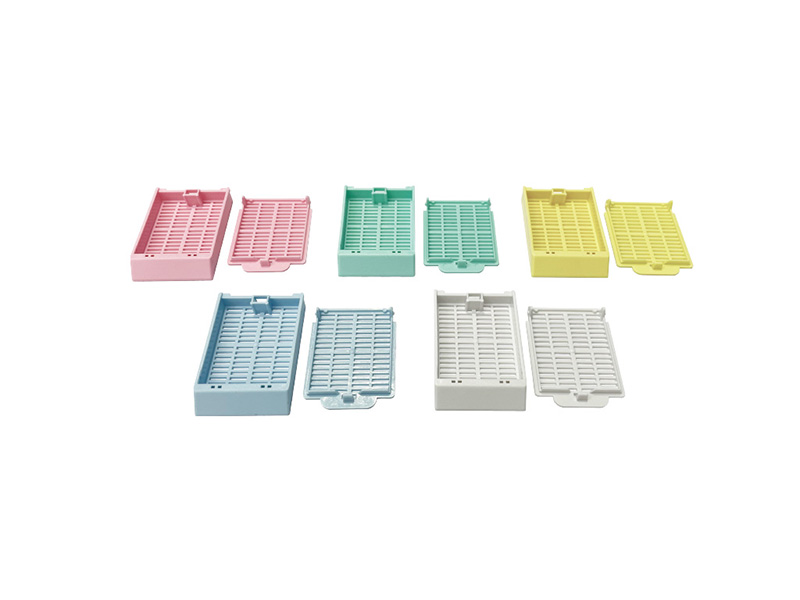
LABSIM provides different types of tissue cassette
Check LIS/LIMS Integration and Workflow Compatibility
Compatibility depends on the interfaces supported by the printer, the laboratory information system, and any middleware used to transfer specimen data.
Data Transfer and Field Mapping
Laboratories should confirm that the cassette printer can receive specimen data from their existing LIS/LIMS through a supported interface. Key fields, such as accession numbers and specimen identifiers, should map correctly to the print template to maintain accurate identification. Checking whether additional software, hardware, or configuration is required can also help clarify integration costs and implementation needs.
Barcode Formats, Software, and Network Requirements
Compatibility with existing barcode scanners, barcode symbologies, operating systems, and network infrastructure should be considered before selecting a printer. Laboratories may benefit from testing sample records and printed barcodes within their current workflow to verify data accuracy and scanning reliability. Confirming software licensing, connectivity options, and IT requirements with the supplier can also help reduce deployment delays.
Calculate the Total Cost of Ownership
The initial purchase price is only one part of a cassette printer’s total cost of ownership (TCO). Laboratories should also account for installation, software configuration, staff training, and any additional hardware required for LIS/LIMS integration. Ongoing expenses depend on the printing technology and may include ink, ribbons, compatible cassettes, replacement parts, and preventive maintenance. Comparing consumable prices, supplier availability, and minimum order quantities helps procurement teams estimate long-term operating costs and assess supply continuity.
Equipment reliability also affects the overall investment. Printer downtime can interrupt cassette preparation and increase the workload for laboratory staff, particularly during peak processing periods. Before purchasing, laboratories should review warranty coverage, maintenance requirements, spare-part availability, and the supplier’s technical response arrangements. Evaluating these factors against expected printing volume and service life provides a more realistic basis for comparing models and identifying the most cost-effective solution for the laboratory’s needs.
Assess Supplier Support Before Making a Purchase
Supplier support affects how reliably a cassette printer operates over its service life. Before finalizing a purchase, pathology laboratories should evaluate the following aspects of after-sales service.
- Warranty and repair coverage. Confirm the warranty period, covered components, exclusions, and procedures for requesting repairs.
- Technical response and troubleshooting. Check the availability of remote assistance, on-site service, and clear response-time commitments, especially for laboratories with high daily printing volumes.
- Installation and system integration. Verify whether the supplier provides equipment setup, software configuration, and assistance with LIS/LIMS connectivity.
- Operator training. Confirm that training covers cassette loading, print-job management, routine cleaning, and error recovery.
- Spare parts and maintenance. Ask about replacement-part availability, recommended maintenance intervals, and the expected lead time for essential components.
Choosing the Right Cassette Printer for Your Laboratory
LABSIM offers a range of tissue cassette printers to support specimen identification in pathology laboratories with different workloads and operational requirements. The TB686 and TB406U are two examples of how specific printer features can address common laboratory needs.
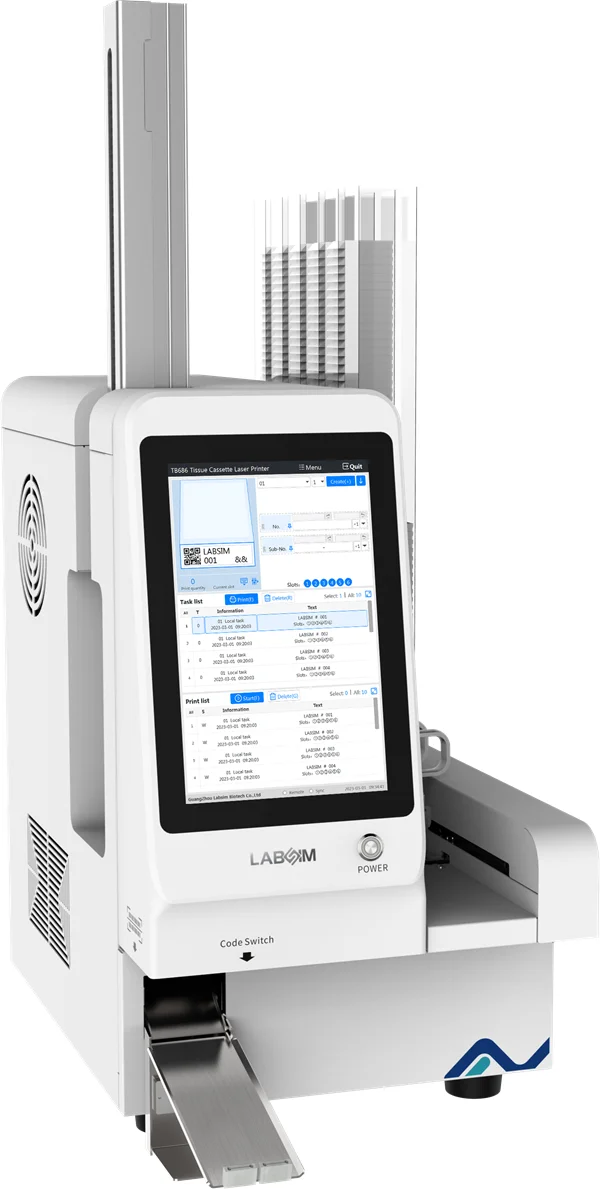
The TB686 Tissue Cassette Laser Printer combines high-resolution UV laser marking with resistance to common histological processing reagents, helping laboratories maintain readable specimen identifiers throughout routine processing. Its multiple loading slots and automatic cassette collection system also support batch printing and reduce repetitive manual handling.
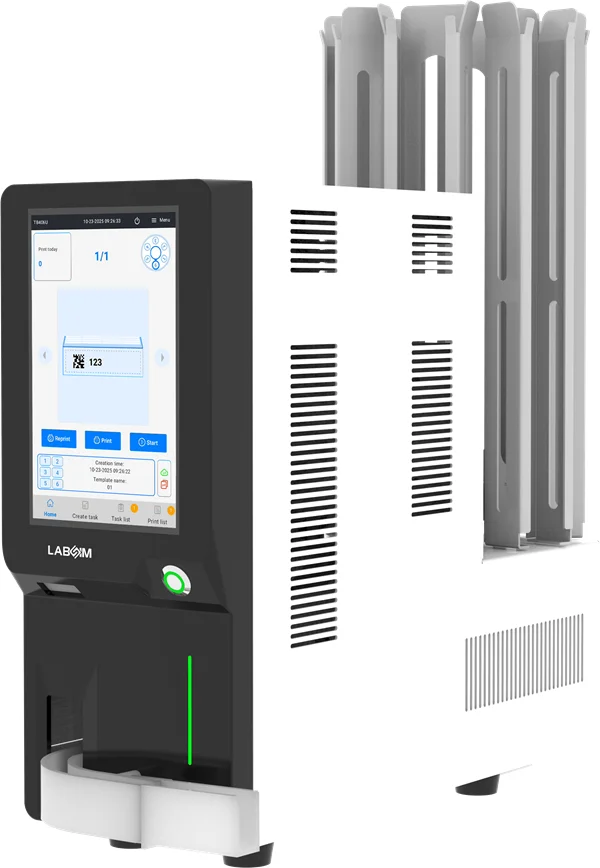
The TB406U Tissue Cassette Laser Printer combines high-resolution UV laser printing with a compact design and flexible loading capacity. Its six loading slots support different cassette colors for specimen differentiation, while the optional centralized collection system facilitates automatic output and batch retrieval. Editable print templates, barcode scanning, and multiple connectivity options also help laboratories streamline routine printing and adapt the device to their existing workflows.
These models represent only part of LABSIM's tissue cassette printer range. The most suitable option depends on cassette compatibility, daily printing volume, identification requirements, and system integration needs. Explore the LABSIM tissue cassette printer range or contact the LABSIM team for guidance on selecting a solution for your laboratory.
Frequently Asked Questions
What is the difference role between a tissue cassette printer and a slide printer?
A tissue cassette printer marks specimen identifiers on embedding cassettes used during tissue processing, while a slide printer prints identification information on microscope slides used for tissue sections and examination. The two devices serve different stages of the pathology workflow and should be selected according to the laboratory's specimen identification requirements.
Can a laser cassette printer print on different types of tissue cassettes?
Compatibility depends on the printer’s laser technology and the cassette material and surface formulation. Laboratories should confirm which cassette models and colors are supported by the manufacturer and test representative consumables before purchase. This helps ensure consistent marking quality and barcode readability across routine applications.
How can laboratories verify cassette printer compatibility with their LIS or LIMS?
Laboratories should confirm the available communication interfaces, supported software environments, barcode formats, and data transfer methods. A practical integration test should verify that specimen identifiers transfer correctly, print templates map the required fields, and printed barcodes can be scanned and matched to the correct records.
What factors affect the long-term cost of a cassette printer?
Long-term costs include the initial equipment price, installation, software integration, compatible cassettes, consumables, maintenance, replacement parts, and potential downtime. Laboratories should compare these expenses against expected printing volume and equipment service life to understand the overall investment.