

Histology Slide Printer Buying Guide: What Should Labs Evaluate?
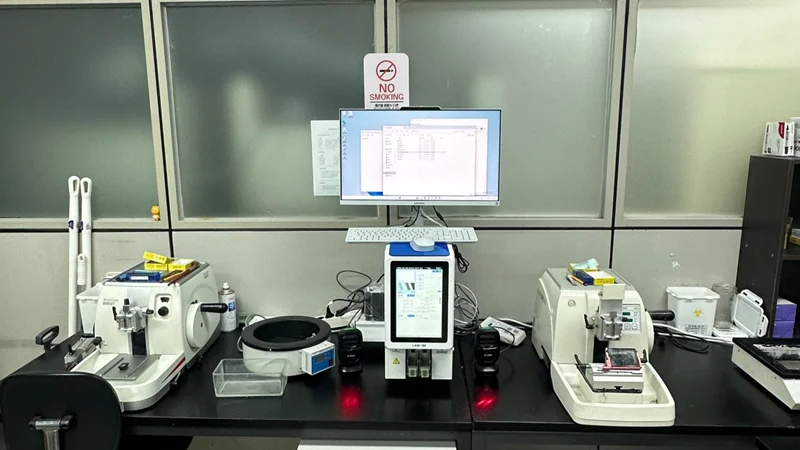
A histology slide printer must meet the practical demands of specimen identification in a laboratory. Buyers need to verify that the equipment supports their glass slide types, prints legible specimen details and barcodes, and handles routine and peak workloads at an acceptable speed. Compatibility with existing laboratory information systems and the availability of technical support also affect daily operation. This guide covers the key factors to assess before purchasing, from print quality and system compatibility to model selection and supplier support.
Define Your Lab's Slide Printing Requirements
Daily Slide Volume and Peak Workload
Looking at the number of pathology slides processed each day will help in deciding what printing speed and slide capacity are needed. Those laboratories which have a high volume of samples or which work with large batches will need a printer that is efficient at meeting peak workloads and one that does not require reloading too often. By examining daily output and batch size it is possible to select an appropriate model.
Slide Types and Identification Requirements
The size, surface type, and printable area of glass slides can differ. The printer had to be capable of handling the kinds of slides normally used in histology work and must be able to produce clear specimen IDs, case numbers, dates, and barcodes. Laboratories that are using slides from different suppliers should check for compatibility before making a purchase.
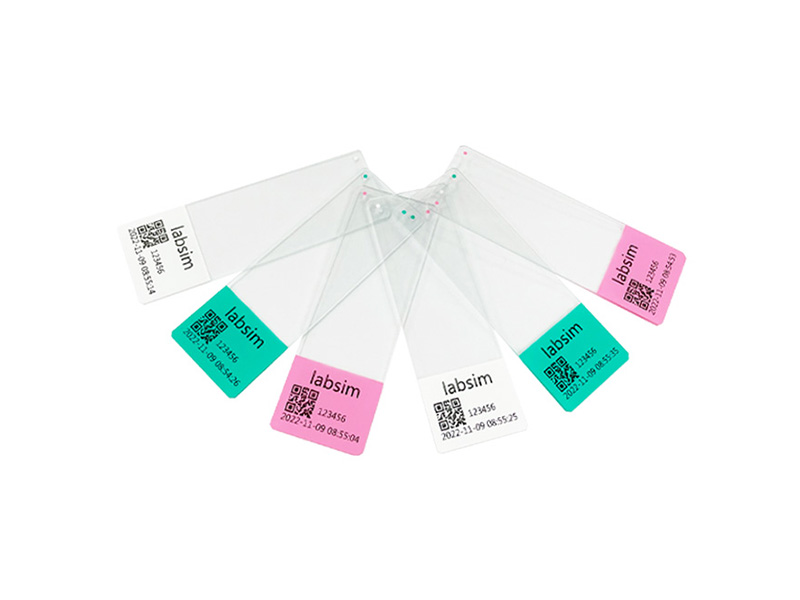
LABSIM provides microscope slides tailored for different mainstream slide printer.
Workflow and Future Needs
The way in which the printer is used in the laboratory also has an impact on the choice of equipment. If the workstation is used on its own it will need simple manual operation, but if it is part of a connected system then integration with the LIS/LIMS is required for specimen data and print jobs. Likewise, any anticipated changes in the amount of samples or in the workflow should be taken into account to make sure that the printer still remains appropriate as the laboratory's needs change.
What histology slide printer specifications should laboratories consider?
Print Quality and Barcode Readability
The clarity with which specimen details can be read and scanned depends on the print quality. Key aspects here are the sharpness of the characters, the contrast of the print, the readability of the barcode, and the alignment of the print within the printable area of the slide. It is possible to check whether the printer gives consistent results by carrying out a sample printing test with the laboratory's ordinary glass slides. The durability of the print should also be verified under real working conditions when the slides have been treated with staining solutions or other laboratory reagents.
Printing Speed and Throughput
A printer's rated speed indicates how quickly it can process individual slides, while batch throughput reflects its performance during routine laboratory work. Data processing, slide loading, and operator involvement can all affect the final output. For example, a lab handling large batches may place greater value on completing a full batch within its available processing time than on the printer’s maximum single-slide speed.
Slide Compatibility and Feeding Design
Slide dimensions, surface coatings, and printable areas affect compatibility with the printer. This is particularly relevant for labs that use frosted-end slides or purchase glass slides from multiple suppliers. The feeding mechanism also influences daily operation. Consistent slide positioning helps maintain print alignment, while a suitable loading design can simplify batch processing and reduce interruptions caused by feeding problems.
Loading Capacity and Ease of Operation
Loading capacity affects how frequently staff need to replenish slides during a batch. A lab processing hundreds of slides in concentrated runs may benefit from a larger hopper, while a smaller facility may place greater importance on footprint and ease of access. The control interface, loading procedure, and access to components that require routine maintenance are also worth assessing during a product demonstration, particularly when several staff members will operate the printer.
Verify LIS/LIMS Integration and Workflow Compatibility
Confirm Data Transfer and Interface Requirements
The printer should support the data output and communication methods used by the lab's LIS or LIMS. Before purchase, the lab needs to confirm supported interfaces, data formats, and any additional software requirements with the printer supplier. These details determine whether specimen information can transfer to the printer without extra system development.
Validate the Complete Printing Workflow
A workflow test should confirm that specimen data appears correctly on the printed slide. Key checks include specimen IDs, case numbers, barcode content, and print templates. The test can also verify whether updated records transfer correctly and whether the printed barcodes can be read by the lab's scanners. This provides direct evidence that the printer can handle the lab's actual labeling requirements.
Assess Total Cost of Ownership and Supplier Support
The total cost of a histology slide printer includes the purchase price, compatible consumables, routine maintenance, replacement parts, and any software or integration fees. Buyers should confirm whether the printer works with their existing glass slides and clarify the cost of any additional supplies or accessories. Maintenance requirements and spare parts availability also affect long-term operating expenses.
Supplier support is equally important, particularly for labs purchasing equipment from overseas manufacturers. Installation requirements, operator training, warranty coverage, technical support response times, and remote troubleshooting options should be clear before an order is placed. Reliable support can help reduce installation delays and keep the printer operating smoothly during routine laboratory work.
Which LABSIM Histology Slide Printer Fits Your Lab?
LABSIM provides slide printing solutions using thermal transfer, UV laser, and infrared laser technologies. The product range supports printing specimen details, characters, symbols, and barcodes on compatible microscope slides, with markings designed to resist common laboratory chemicals such as xylene and alcohol. Depending on the model, features include built-in barcode scanning, standalone operation, multiple slide-loading options, and batch collection. These options help laboratories select a printer based on their identification requirements, daily workload, and preferred operating process.
G306 Thermal Slide Printer for Flexible Slide Handling
The G306 thermal slide printer is worth considering for laboratories that need flexible slide handling and centralized collection. Its dual-slot design accommodates two different slide types, while the centralized collection mode can collect at least 150 slides. It also supports connectivity options including Wi-Fi, USB, Bluetooth, Ethernet, and serial interfaces. These features help laboratories handling different slide types organize printing and collection within a single workstation. Compatibility with the laboratory’s specific slide supplies should still be confirmed before purchase.
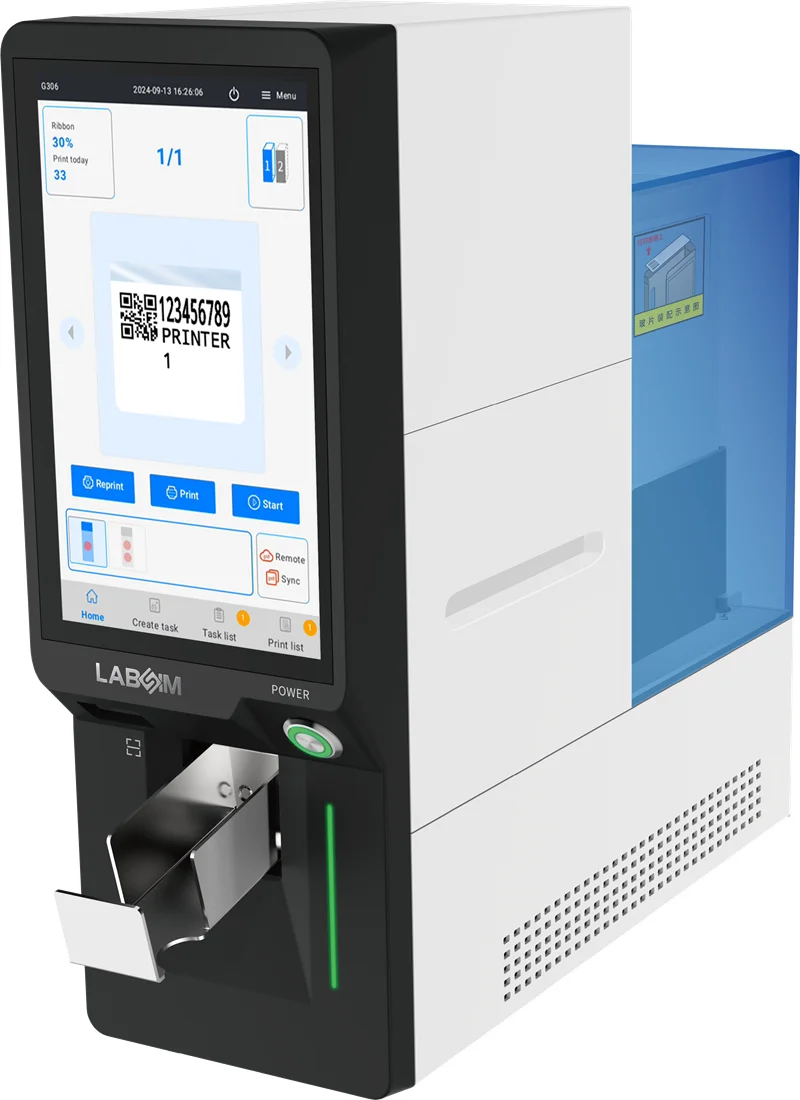
G306U UV Laser Slide Printer for High-Resolution Identification
The G306U uses laser technology and is available in UV and infrared laser configurations across the G306U/G306I range. The UV laser configuration offers a small laser spot and high printing precision, supporting clear, high-resolution QR codes and related specimen information. Its non-contact printing process requires no printing consumables, and the integrated design supports standalone operation without an external computer. This configuration is suitable for laboratories that prioritize detailed barcode printing and want to simplify the workstation setup.
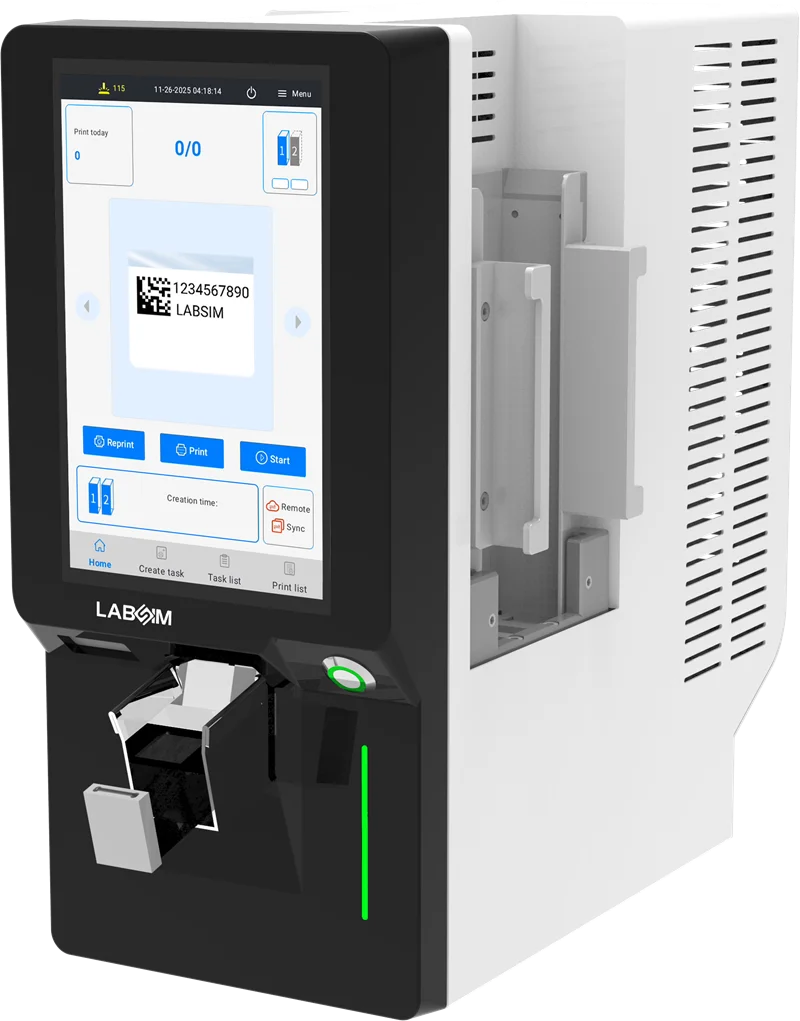
G364D Dual-Hopper Laser Slide Printer for Batch Processing
The G364D is a UV laser slide printer with a dual-hopper design. Each hopper supports a loading capacity of at least 100 slides, allowing two slide batches to be handled within the same unit. Its dual collection arrangement supports separate output collection, making it a relevant option for laboratories processing larger batches or managing different slide groups. The printer also includes an integrated operating system and a built-in barcode scanner, supporting standalone operation and specimen identification workflows.
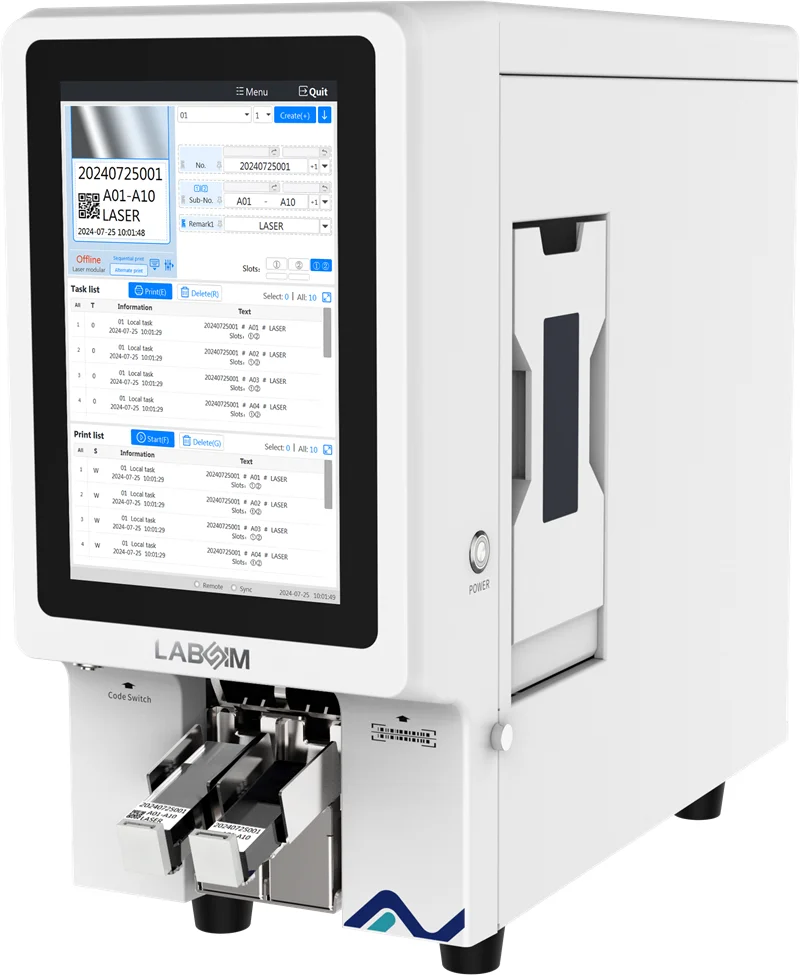
The most suitable model depends on the laboratory's slide type, batch size, barcode requirements, and preferred collection method. Before purchase, buyers can review LABSIM slide printer models and confirm slide compatibility, interface requirements, and model-specific specifications with the supplier. A sample-printing test can also help verify print clarity and barcode readability under routine laboratory conditions.
Pre-Purchase Evaluation Checklist for Histology Slide Printers
Before purchasing a histology slide printer, laboratories can use the following checklist to verify whether a model meets their operational needs.
- Slide compatibility has been confirmed with the laboratory’s existing glass slides.
- Print clarity, barcode readability, and chemical resistance meet identification requirements.
- Printing speed and loading capacity support routine and peak workloads.
- LIS/LIMS connectivity and data transfer requirements have been verified.
- Loading, output collection, and daily maintenance fit the laboratory’s workflow.
- Consumable costs, warranty coverage, and technical support arrangements are clear.
- A sample-printing test or product demonstration has confirmed the printer’s suitability.
FAQ
1. What Is the Difference Between a Laser Slide Printer and a Thermal Slide Printer?
Laser slide printers use laser technology to mark slide surfaces, while thermal slide printers use heat-based printing technology. The two options differ in their printing processes, consumable requirements, and supported slide types. The most suitable choice depends on the laboratory’s identification needs, slide compatibility, and workflow. Buyers can compare the technologies and test sample slides before making a decision.
2. What Information Can a Histology Slide Printer Print on Glass Slides?
A histology slide printer can print specimen identifiers, case numbers, letters, symbols, and barcodes. Depending on the printer’s capabilities and software, laboratories may also use customized templates to organize the information. Print layout and barcode readability should be tested to ensure the details fit within the slide’s printable area and can be scanned reliably.
3. Are Histology Slide Printers Compatible with Different Types of Microscope Slides?
Compatibility depends on the printer’s specifications and the slides being used. Differences in slide dimensions, surface coatings, colors, and printable areas may affect printing results. Laboratories using slides from multiple suppliers should confirm compatibility with the manufacturer and test representative samples before purchasing equipment.
4. How Can Laboratories Ensure Barcode Readability on Printed Slides?
Barcode readability depends on print precision, contrast, alignment, barcode size, and the scanning equipment used in the laboratory. A practical evaluation includes printing representative specimen data on the laboratory’s regular slides and scanning the resulting barcodes. Testing under routine working conditions helps identify layout or compatibility issues before the printer enters daily use.
5. What Should Laboratories Consider When Integrating a Slide Printer with LIS or LIMS?
Laboratories should verify supported communication interfaces, data formats, software requirements, and compatibility with their existing information systems. Testing the complete workflow can confirm that specimen records transfer correctly and that printed identifiers match the source data. Buyers should also clarify whether additional software configuration or integration work is required before installation.
Conclusion
Selecting the right histology slide printer requires a clear understanding of laboratory workloads, slide compatibility, identification requirements, and system integration. Print quality, loading capacity, maintenance, and supplier support also influence long-term performance. LABSIM offers UV laser, infrared laser, and thermal slide printing solutions for different laboratory workflows. Share your slide types, daily printing volume, and interface requirements with LABSIM to identify a suitable model for your laboratory.