

The Role of Slide Labeling in Digital Pathology Workflows
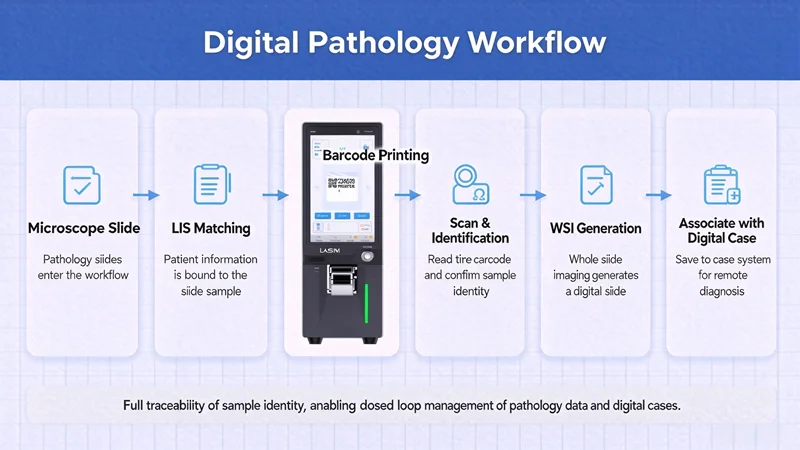
Digital pathology relies on accurate digital images and reliable specimen information. During the transition from glass slides to whole slide images (WSIs), each physical slide needs a clear identifier that connects it with the correct patient, case, and tissue specimen. Slide labeling provides this link by carrying essential identification data into the scanning process and supporting image management afterward. Barcode quality, label durability, and consistent identification practices all influence how efficiently pathology laboratories can associate digital images with their original specimens. A well-planned labeling process therefore forms an important part of a reliable digital pathology workflow.
Slide Labeling in Digital Pathology
Unique Identification for Each Slide
In a pathology laboratory, specimen identification involves several levels of information. Patient ID identifies the individual, Case ID refers to a specific examination, and Block ID distinguishes tissue blocks prepared from the specimen. Each glass slide also needs its own Slide ID, allowing individual slides from the same case to be identified and tracked.
This distinction becomes particularly important when a case involves multiple tissue sections, staining procedures, or repeat examinations. A shared case number alone may not provide enough detail to distinguish every slide. Assigning a unique identifier to each slide helps maintain this distinction throughout preparation, scanning, storage, and review.
Barcodes and QR codes offer a practical way to encode slide identifiers in a compact, machine-readable format. They allow scanners to capture identification data efficiently and reduce reliance on manual entry. The printed code should remain clear and complete so that the slide can be recognized consistently during subsequent processing.
Linking Slides with LIS and WSI Files
The connection between a physical slide and its digital image depends on coordinated identification across laboratory systems. Before scanning, slide information is typically recorded or managed through a Laboratory Information System (LIS). A scanner can read the barcode or QR code on the glass slide and use the captured identifier to locate the corresponding specimen or case record.
After scanning, the resulting Whole Slide Image (WSI) can be associated with its Slide ID and relevant case information through the configured data workflow. This relationship supports image retrieval, case review, and traceability by preserving the link between the digital file and the original physical specimen.
Reliable association depends on several elements working together, including consistent ID assignment, readable printed codes, scanner recognition, and appropriate system interfaces. The labeling process establishes the identification information, while the laboratory's software and scanning infrastructure determine how that information is transferred and matched.
Slide Labeling Across the Digital Workflow
Before Scanning
Before a glass slide enters the scanning stage, its identification details need to be printed checked against the corresponding specimen and case records. This step helps confirm that the slide carries the correct Slide ID and that its barcode or QR code is complete and readable. Label placement also deserves attention, as the printed area needs to remain accessible to the scanner without covering the tissue section. A brief pre-scanning check can help identify labeling problems before they affect image acquisition.
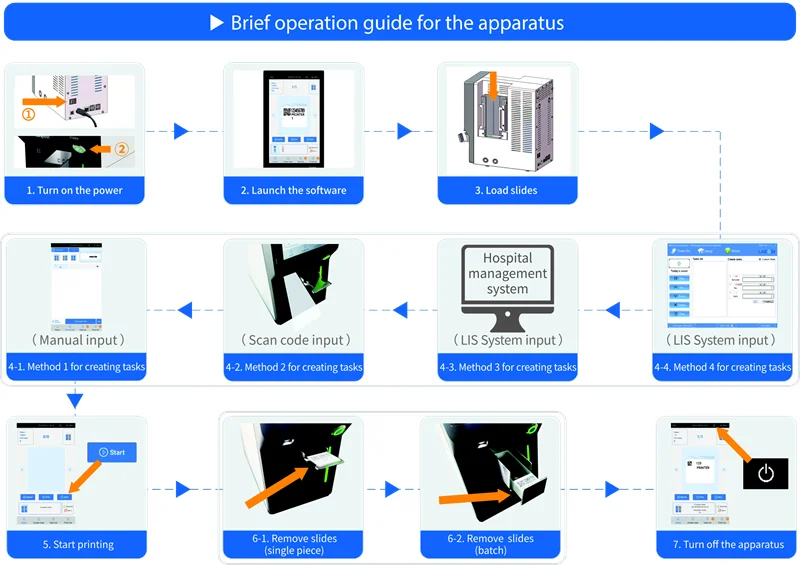
Slide labeling and printing operation workflow from LABSIM G306U Slide Printer
During Scanning
During image acquisition, the scanner reads the slide identifier and uses it to support the association between the physical slide and its digital record. Depending on the scanner and laboratory system configuration, this information can be transferred to the relevant case management workflow. Automated barcode recognition reduces manual data entry and helps maintain consistent identification across large numbers of slides. Clear codes and standardized labeling formats also make the scanning process more predictable, particularly when laboratories handle multiple cases in parallel.
After Scanning
Once scanning is complete, the WSI needs to remain associated with the correct slide and case information. This relationship supports image retrieval, digital consultation, and subsequent pathological review. When a case contains multiple slides, individual identifiers help users distinguish images by slide, tissue block, or staining procedure. Consistent identification also improves traceability when digital images need to be checked against archived glass slides, reviewed again, or shared with other professionals.
Common Slide Labeling Issues
Slide labeling problems can affect identification accuracy at different stages of a digital pathology workflow. Even when a slide is successfully scanned, poor-quality identification data can complicate image matching, retrieval, and traceability.
- Unreadable Barcodes: Low print contrast, blurred lines, incomplete symbols, or surface damage can prevent scanners from recognizing the encoded information. Repeated scanning attempts may slow down slide processing and create additional manual work.
- Missing Identifiers: A slide without the required identification details may need manual verification against specimen records. This increases the workload for laboratory staff and makes consistent tracking more difficult, especially when several slides belong to the same case.
- Duplicate or Inconsistent IDs: Repeated identifiers or discrepancies between printed labels and LIS records can create ambiguity during image association. Such inconsistencies may require staff to check the original specimen and case information before proceeding.
- Poor Label Placement: Labels positioned over tissue sections can reduce the usable scanning area or interfere with image acquisition. Consistent placement within the designated labeling area helps preserve the tissue region for scanning.
- Damaged or Faded Labels: Exposure to chemicals used in histology processing may affect printed information when the slide surface or printing method is unsuitable. This can make previously identifiable slides difficult to verify during later review.
- Multiple Barcodes: Referral slides or externally prepared specimens may carry more than one barcode. When scanners encounter multiple codes, the intended identifier may require additional verification to prevent incorrect data association.
Requirements for Reliable Slide Labeling
Reliable slide identification depends on print quality, label durability, consistent formatting, and compatibility with laboratory systems. These factors help ensure that identification data remains usable throughout specimen processing and digital image management.
Clear Barcode Printing
Barcodes and QR codes need sufficient clarity, contrast, and completeness for accurate scanner recognition. Fine lines, dense patterns, or small characters can become difficult to read when printing quality is inconsistent. The selected printing method and compatible microscope slides should produce sharp, well-defined codes that scanners can capture reliably.
Chemical Resistance and Durability
Pathology slides are exposed to chemicals during routine preparation and staining procedures. Printing that fades, smears, or deteriorates after contact with reagents can compromise identification during later handling. Labels therefore need to retain readable information under common laboratory conditions, including exposure to substances such as xylene and alcohol.
Consistent Identification and Placement
A standardized labeling format helps laboratory staff interpret slide information and supports consistent scanning across different workstations. Identifier placement also needs to follow a defined position on the slide, keeping the barcode accessible while preserving the tissue area for microscopic examination and digital scanning.
LIS and Scanner Compatibility
The labeling workflow needs to align with the laboratory's identification rules and information systems. Barcode formats, scanner capabilities, and LIS data fields should be configured to support accurate ID recognition and record matching. Compatibility testing within the actual laboratory environment can help identify interface or data-mapping issues before routine implementation.
Slide Printers for Digital Pathology
Precise Barcode and QR Code Printing
Barcode and QR code quality is an important consideration when selecting a slide printer for digital pathology workflows. Laser slide printers use focused laser technology to produce clear identification details, including text, barcodes, and QR codes. LABSIM's G364P UV Laser Slide Printer is designed for this application. Its high-precision laser technology supports the printing of high-resolution QR codes and specimen information, helping scanners capture slide identifiers accurately. The model also features a built-in barcode scanner and supports an optional external scanner.
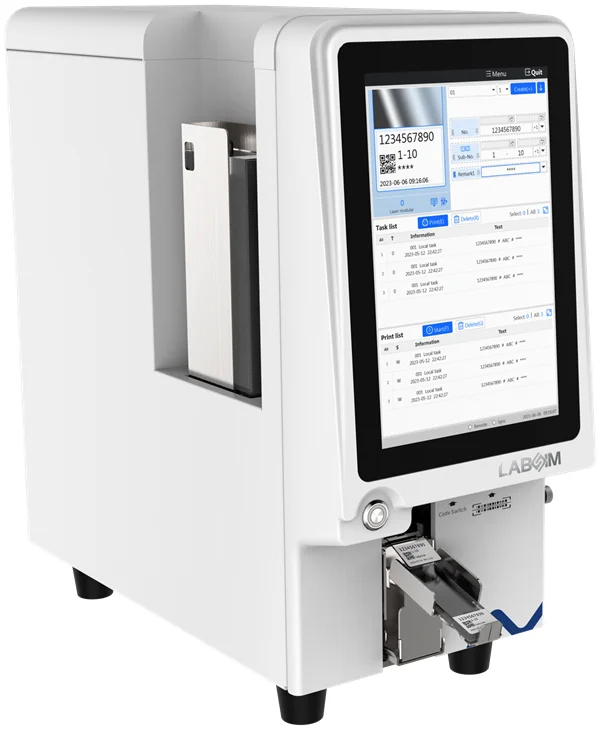
Durable Slide Identification
Printed identifiers need to remain legible throughout routine histology procedures. LABSIM laser slide printers produce markings designed to resist exposure to xylene, alcohol, and decalcifying fluid. This durability helps preserve specimen information during slide processing and subsequent handling, supporting identification over the course of laboratory use.
Flexible Printing and Collection
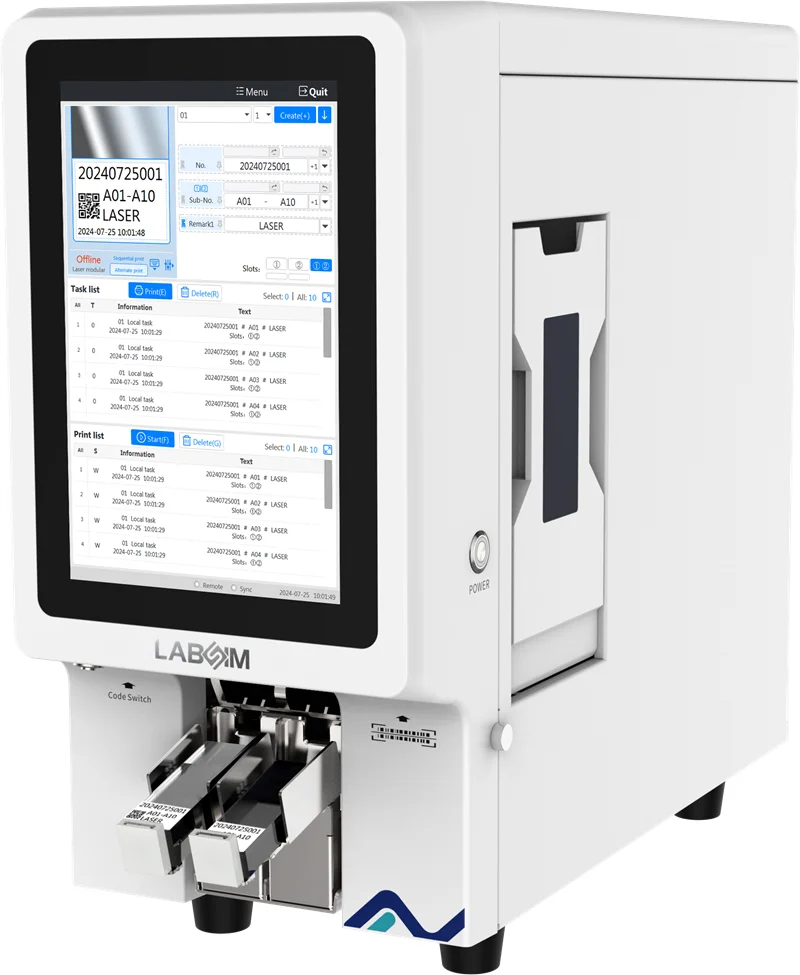
Different laboratories have different slide volumes and handling requirements. A printer with flexible output options can accommodate both individual requests and larger batches. The G364P supports print-on-demand operation and batch printing with FIFO collection, allowing laboratories to select a mode that fits their daily workload. For higher-volume operations requiring separate slide handling, the G364D features a dual-hopper design with two loading and collection compartments. These configurations offer practical options for organizing slide output within different pathology workflows.
Improving Digital Pathology Traceability
Accurate slide labeling supports the connection between physical specimens, digital images, and laboratory records. Clear barcode printing, durable identification, standardized label placement, and reliable scanner recognition all contribute to consistent image association and traceability. These practices work best when supported by appropriate LIS integration and routine verification throughout the scanning process.
For pathology laboratories looking to strengthen slide identification, selecting a printer that meets their barcode quality, chemical resistance, and workflow requirements is an important step. Explore LABSIM Slide Printers for Pathology Laboratories to find a solution suited to your laboratory's slide labeling and digital pathology workflow.